
Seeing 'API Error: Server is temporarily limiting requests (not your usage limit)' or HTTP 429 Too Many Requests in Claude Code while your Pro or Max subscription meter still shows plenty of remaining capacity is a common friction point.
Per Anthropic's Claude Code Error Reference, this message indicates a short-term throughput throttle or credential mismatch rather than an exhausted session or weekly plan quota. Walk through these five checks in order to resolve it:
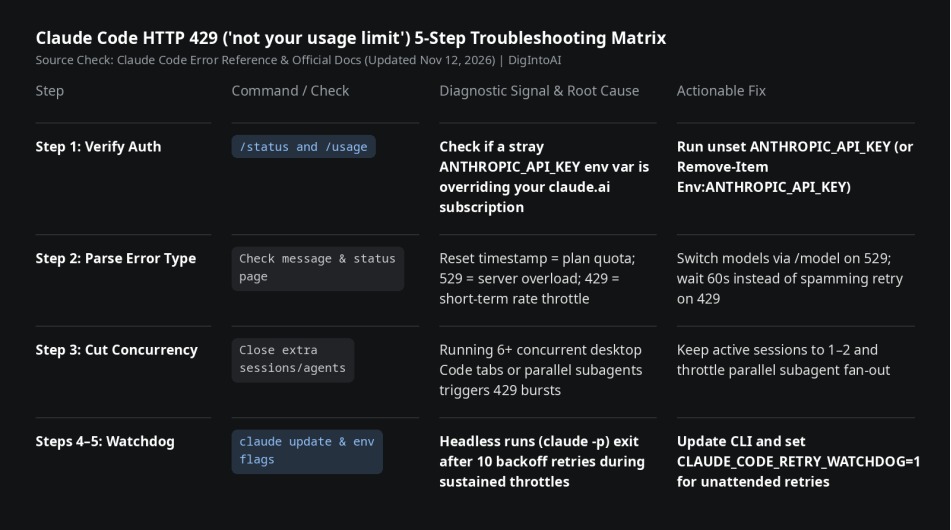
Step-by-Step Troubleshooting
Step 1 — Check /status for a Stray ANTHROPIC_API_KEY: If an old ANTHROPIC_API_KEY environment variable exists in your shell profile, Claude Code routes traffic through that API key instead of your claude.ai subscription. Low-tier API keys hit per-minute rate limits almost immediately. Run /status to verify the active credential; if an API key is overriding your login, run unset ANTHROPIC_API_KEY (or Remove-Item Env:ANTHROPIC_API_KEY in PowerShell) and sign in again with /login.
Step 2 — Distinguish 429 Throttles from 529 Overload and Plan Limits: Messages showing a reset timestamp mean you hit your rolling 5-hour or weekly subscription allowance. HTTP 529 ('Overloaded') reflects server-side capacity saturation across users, which you can often bypass by switching models via /model. When the error specifically reads 'not your usage limit' or 429 rate_limit_error, pause for 60 seconds rather than spamming retries, which adds to request pressure.
Step 3 — Close Parallel Desktop Sessions and Subagent Fan-Outs: Running six or more concurrent Claude Desktop Code tabs or spawning heavy parallel subagents frequently triggers short-burst RPM and token-per-minute throttles. Keep active sessions to one or two while working through large tasks.
Step 4 — Update Claude Code to the Latest Stable Build: Builds from v2.1.199 onward (latest v2.1.323) automatically absorb transient 429s with up to 10 exponential backoff retries before surfacing an error. Run claude update to ensure automatic backoff is active.
Step 5 — Enable Retry Watchdog for Headless Jobs: For unattended claude -p scripts or overnight runs that may outlast the default 10-retry window, set CLAUDE_CODE_RETRY_WATCHDOG=1 so Claude Code keeps retrying through 429 and 529 throttles until service recovers (optionally cap total wait time with CLAUDE_CODE_RETRY_WATCHDOG_MAX_WAIT_MS=3600000 for one hour).