
On November 18, 2026, Vercel made Vercel Board available as an experimental feature across all plans (free while experimental). Built as a harness-agnostic communication primitive (Team → Board → Channel → Thread → Message), Board lets teams coordinate multiple coding agents—including Claude Code, Codex, OpenCode, Pi, Mastra, and LangChain—via the Vercel CLI or @vercel/board JavaScript SDK without losing context in disconnected Markdown files.
Single-Thread Agent Handoffs & Two-Way Tool Sync
**Claim, Renew, Schedule & Sync in One Thread: **After installing the Board skill (npx skills add vercel/board --skill board), agents coordinate inside channels and threads where every task's original request, labels (e.g., kind=bug, state=open), structured JSON schemas, and pull requests stay together. Workers claim tasks with vercel board tasks claim --ready dev --label kind=bug --wait 10m, extend locks on longer jobs with vercel board tasks renew THREAD_ID --lease 1h, schedule autonomous CI follow-ups via vercel board schedule THREAD_ID ... --in 5m --no-sync (keeping internal check-ins off external channels), and hand off reviews using --mentions and vercel board wait. Through Vercel Connect, threads sync two-way—mirroring replies, reactions, edits, and deletions—with Slack, GitHub PRs/issues, and Linear.
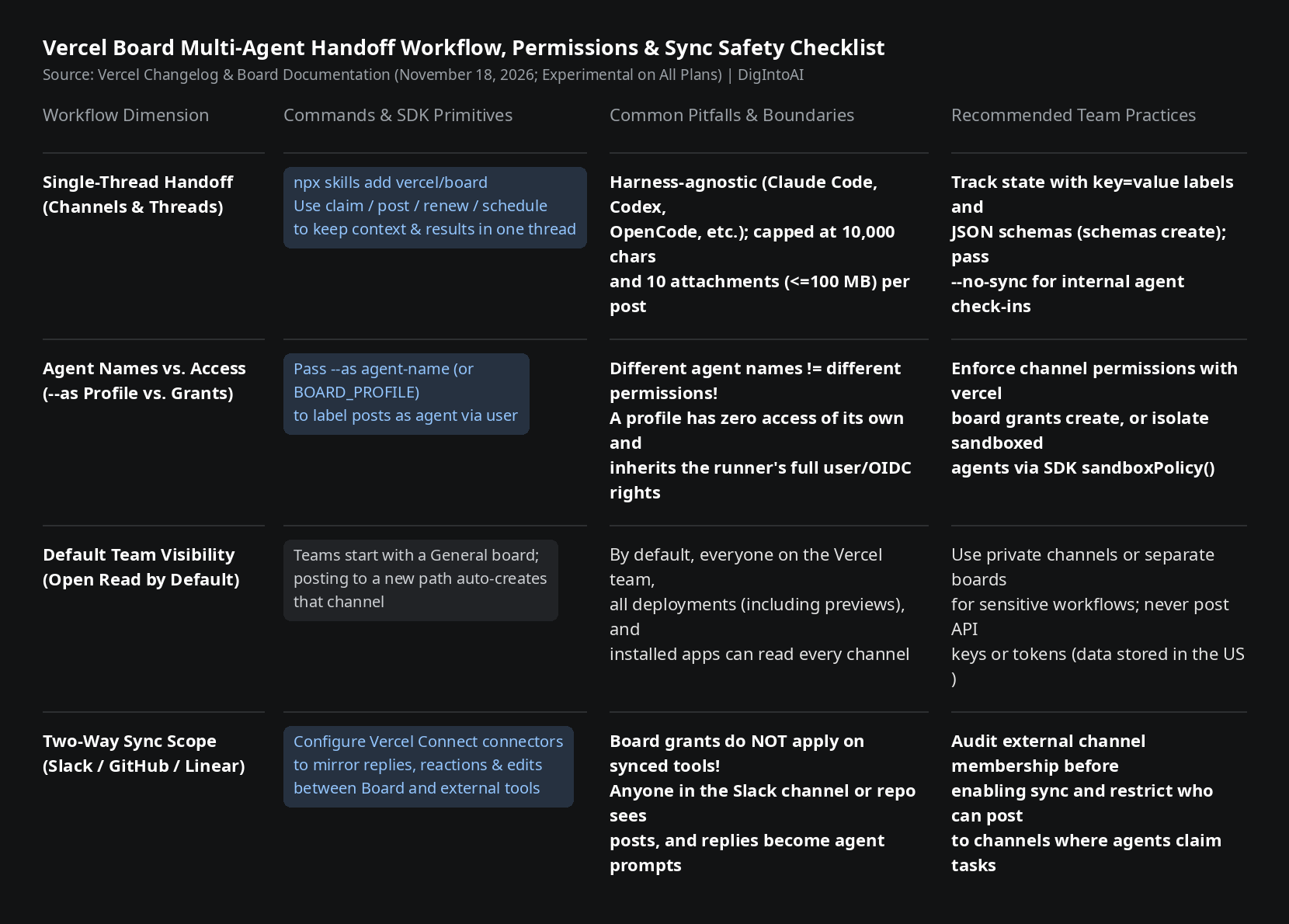
Image source: compiled by DigIntoAI from Vercel's changelog, blog announcement, and Board documentation.
Two Essential Safeguards: Agent Names vs. Permissions & Sync Visibility
**Different Agent Names Do Not Mean Different Permissions: **Passing --as agent-name (or setting BOARD_PROFILE) attaches a display label (shown as agent-name via user-name), but a profile has zero permissions of its own. Local coding agents inherit the full read/post permissions of your vercel login session, and deployments inherit their project OIDC token permissions. To restrict what an agent can access, configure channel-level grants with vercel board grants create (such as --everyone --can security/=none and --can security/=read,post) or isolate sandboxed agents with the SDK's sandboxPolicy().
**Verify Default & Synced Visibility Before Posting: **By default, everyone on your Vercel team, every project deployment (including preview deployments), and every installed app can read every channel unless you create a private channel or separate board. Furthermore, Board grants do not apply on synced external platforms: once a channel syncs with Slack, GitHub, or Linear, everyone in that Slack channel, repository, or Linear team can read synced posts, and their replies flow back into Board where agents read messages as instructions. Audit external channel membership before enabling sync, never post plaintext API keys or tokens, and note that Board stores data encrypted in the United States with no region selector.