
On November 19, 2026, Microsoft Edge announced three on-device web AI updates under its 'hybrid intelligence' push: general availability of the 2.3B-parameter Aion Instruct (replacing Phi-4-mini as Edge's built-in small language model and shipping under the MIT license as microsoft/Aion-1.0-Instruct-2.3B), a Prompt API Origin Trial for live websites, and an experimental Decisions API preview in Edge Canary and Dev. While web pages can now run AI inference completely offline with zero cloud API costs after initial download, not every PC meets the hardware gates.
Hardware & Storage Gates: 3 GB VRAM, 20 GB Free Disk Space, and Unmetered Network
**Lowered VRAM Floor, Yet Clear Compatibility Boundaries: **Moving from the 3.8B Phi-4-mini (which required at least 5.5 GB of VRAM in Edge) to the approx. 2.29B Aion Instruct (32,768-token context, December 2025 cutoff) expands device reach, but Microsoft Learn's Prompt API documentation specifies four mandatory gates. First, GPU memory requires at least 3 GB of VRAM (device performance class Medium or higher in edge://on-device-internals). Second, storage requires at least 20 GB of free space on the volume containing your Edge profile—crucially, 20 GB is a free-space headroom rule, not the model download size, and Edge automatically deletes the model if free space drops below 5 GB. Third, initial download requires an unmetered network connection (Edge skips downloads on metered networks). Fourth, OS support covers Windows 10/11 and macOS 13.3+ (Edge 158+) plus 64-bit x64 Linux with Vulkan GPU drivers (Edge 159+). Users can disable On-device AI anytime under Settings → Copilot and AI to remove the model, and enterprise admins can block downloads via policy.
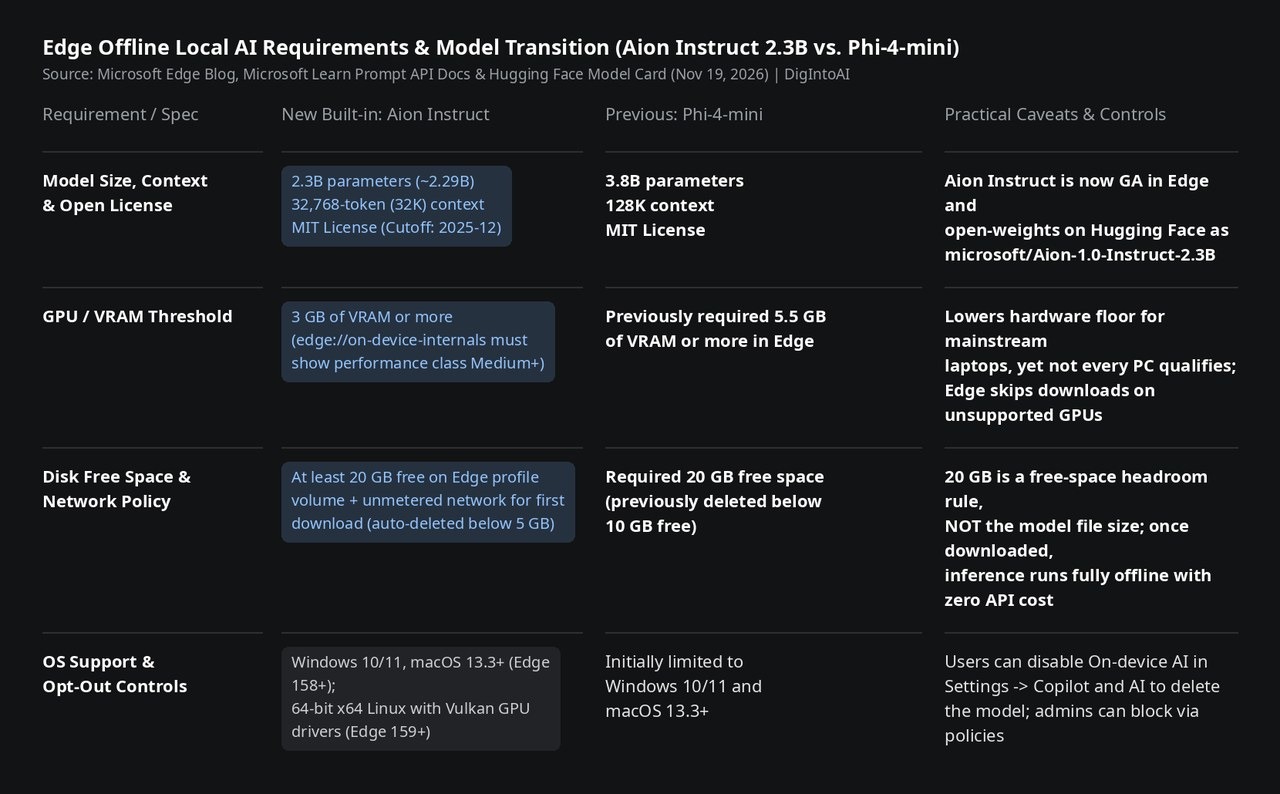
Image source: compiled by DigIntoAI from the Microsoft Edge Blog, Microsoft Learn docs, and Hugging Face model card.
Best Demo Flow: Verify Readiness, Go Offline, and Test Chinese, Japanese, and English
**Hands-On Verification & Origin Trial Scope: **To demonstrate local offline inference cleanly: upgrade to Edge 158+ (159+ on x64 Linux), enable the Prompt API flag at edge://flags and restart, confirm Medium+ device class at edge://on-device-internals, and open the Prompt API playground until the status banner switches from Model downloading, please wait to API and model ready. Then disconnect Wi-Fi or Ethernet completely and prompt three short texts in Chinese, Japanese, and English (all three are among Aion Instruct's 8 officially supported languages alongside German, Spanish, Portuguese, Italian, and French). For live websites, developers must still register for the time-limited Prompt API Origin Trial (Canary, Dev, and Beta disable On-device AI by default unless flagged or manually enabled), while keeping in mind Aion Instruct's model-card profile—strong instruction following (IFEval 83.90, Multi-IF 64.70) and schema-constrained outputs, but weak world knowledge (MMLU 55.15, GPQA 28.18)—so production apps should check LanguageModel.availability() and fall back to cloud APIs when needed.
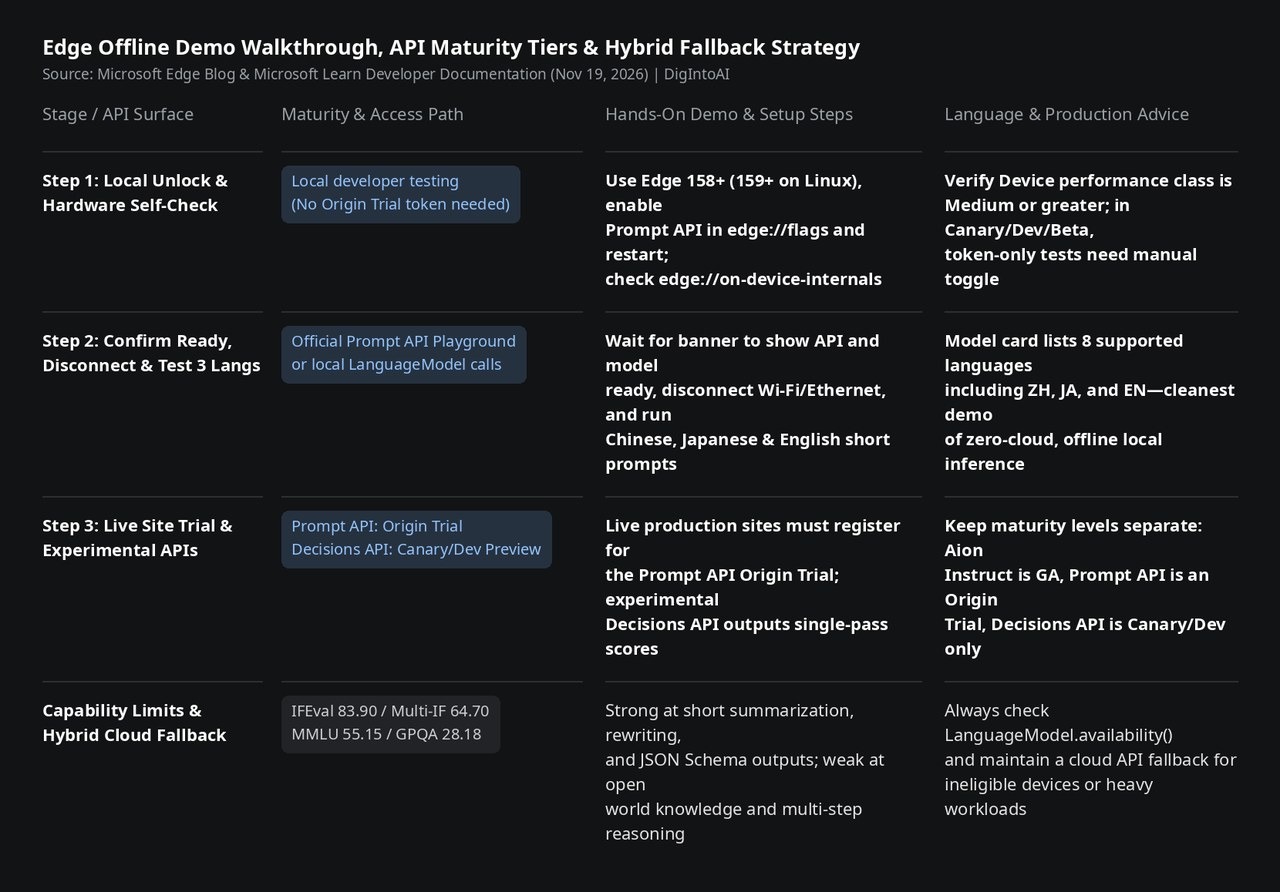
Image source: compiled by DigIntoAI from Microsoft Edge developer announcements and Prompt API documentation.