
On this page
On November 13, 2026, Suno announced the beta launch of Suno Bridge (titled Bridge (beta) across its product page and navigation), a standalone desktop application that integrates Suno's generative music tools directly into a producer's existing DAW session and VST workflow. Rather than an incremental update to the web-based Suno Studio or MCP connectors, Bridge runs as a separate desktop app.
Official documentation uses slightly varied phrasing regarding DAW compatibility: the product page states Bridge is currently Mac-only and compatible with Ableton Live 12, the blog notes compatibility with Ableton Live 12 running on a Mac, and the product FAQ specifies compatibility with Ableton Live 12 or later at beta launch. Suno also notes that Bridge was developed independently of Ableton, and that support for additional operating systems and DAWs is planned for future updates.
How Bridge Works with Ableton Live
Bridge must be open alongside Ableton Live so generated instrumental or vocal stems automatically match the session's tempo, key, style, harmony, and groove without manual dragging or time-stretching:
**Install & Sign In: **Download Suno-Bridge.dmg (103.9 MB), drag it into Applications, and sign in with an eligible Suno account.
**Open Session & Upload Project: **Open your Ableton Live session first, launch Bridge, and upload the project when prompted.
**Set Loop Window & Prompt: **Highlight a loop region in Live's Arrangement View (Cmd+L), then select an instrument type and describe the desired sound in Bridge.
**Direct Timeline Drop & Local Downloads: **Generated clips drop straight onto the Live timeline. Per the FAQ, audio created in Bridge does not appear in your Suno web library; instead, files are stored under the Bridge window's avatar menu under Downloads.
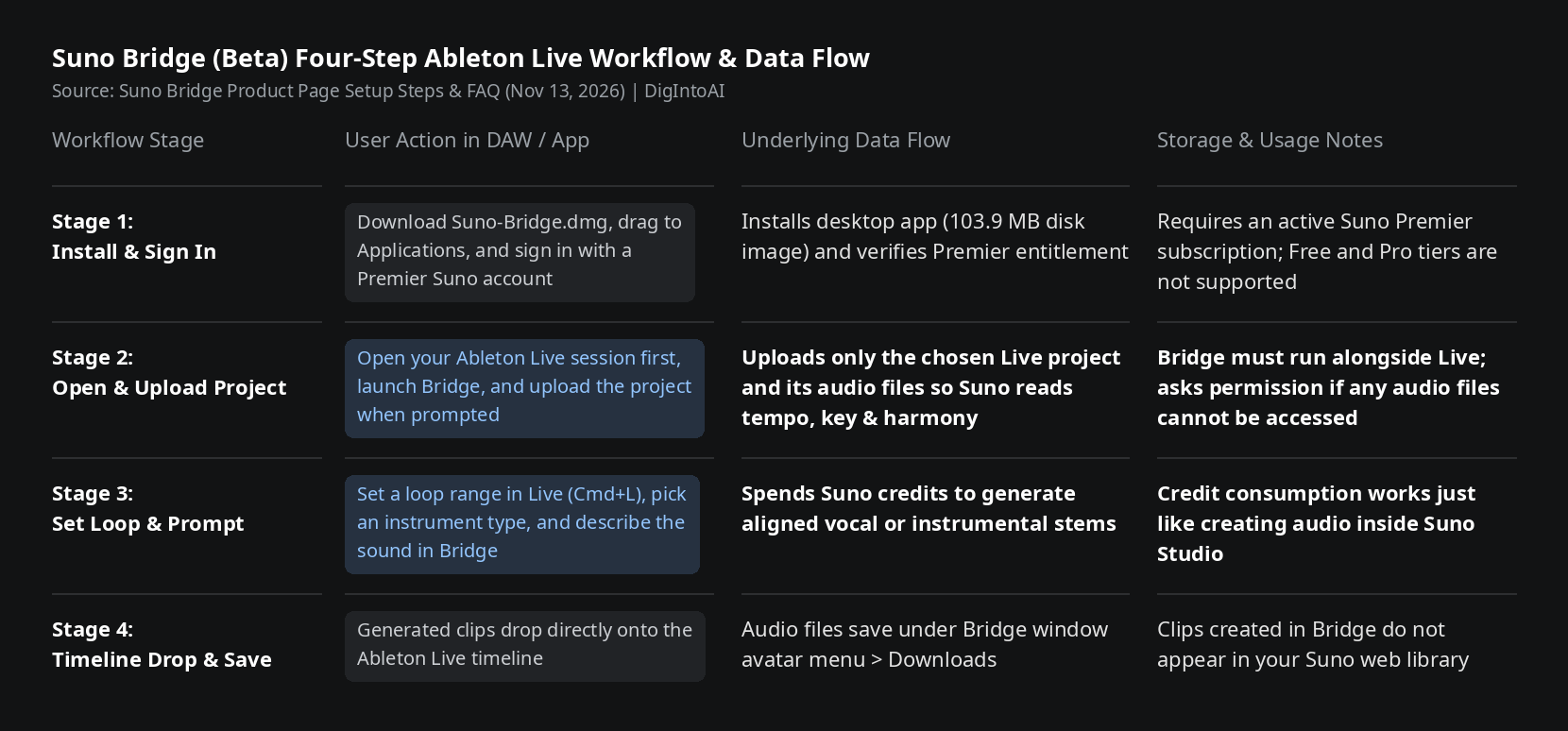
Image source: compiled by DigIntoAI from the Suno Bridge product page setup steps and FAQ.
Premier Subscription Requirement, Credit Spend & Session Privacy
**Free Download, Premier Plan Required, Credits Consumed: **While the Bridge installer is a free download, operating Bridge requires a Suno Premier subscription, and generating audio consumes Suno credits just like creating in Studio. On Suno's pricing page (which does not list a separate fee for Bridge), Premier is priced at $30/month ($24/month billed annually at $288/year) with 10,000 monthly credits, 60 song downloads per month, and Suno Studio access, whereas the $10/month Pro tier ($8/month annually) is not listed as including Bridge.
**Project Uploads & Copyright Detection Filters: **Per the product FAQ, opening a session in Bridge uploads only the chosen Ableton Live project and its audio files to your Suno account so Suno can generate matching takes; if certain audio files cannot be accessed, Bridge asks permission before including them. Uploaded audio passes through filters designed to detect copyrighted material—flagged files are not ingested into Suno, and in projects mixing original and rights-holder audio, only the rights-holder material is blocked.
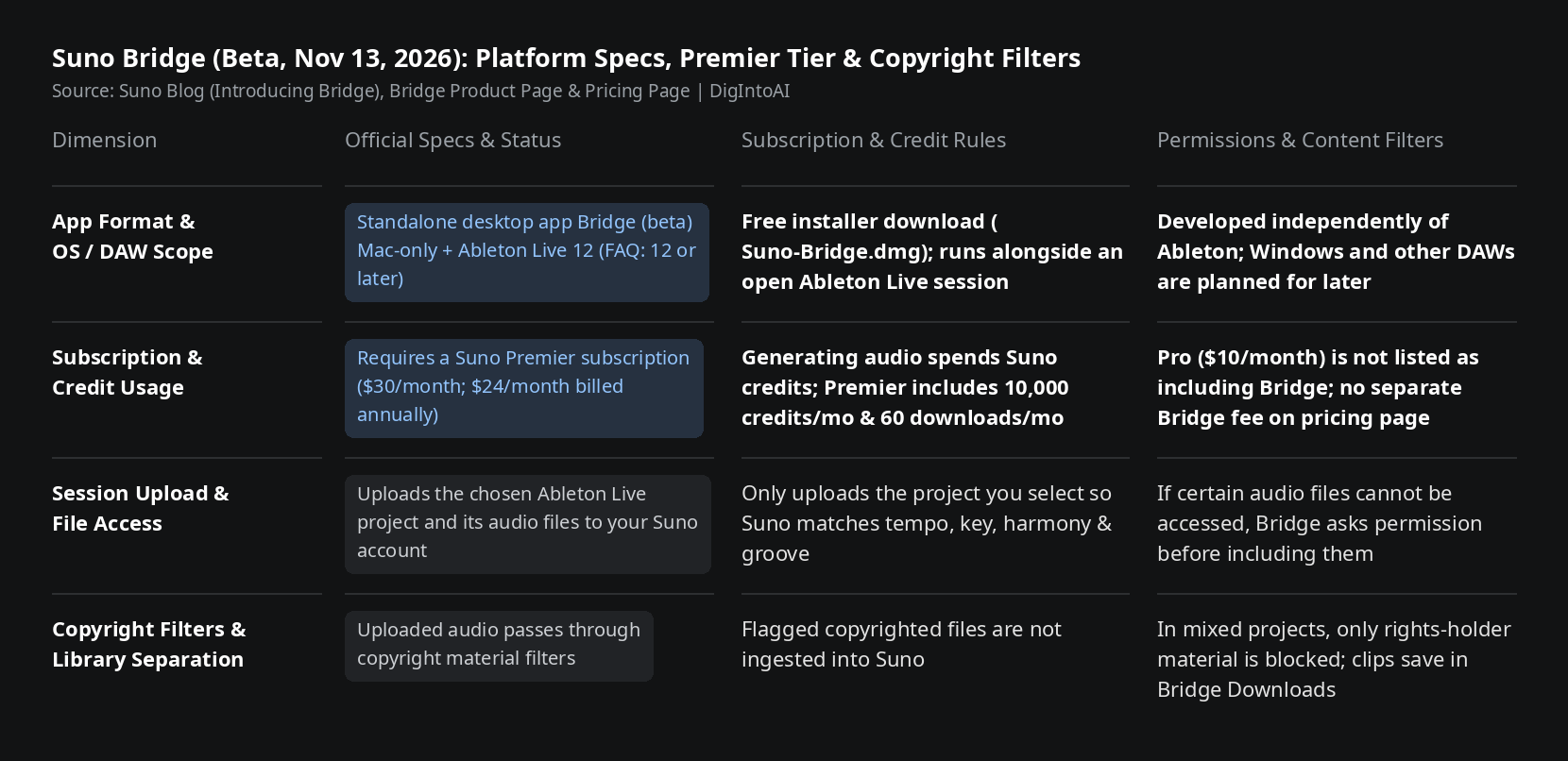
Image source: compiled by DigIntoAI from Suno's blog post, Bridge product page, and pricing page.
Platform Scope & Roadmap
**Currently Mac-only with Ableton Live 12+: **Bridge is currently in beta for macOS and Ableton Live 12 (or later), with support for Windows and additional DAWs planned for future updates.