
On November 18, 2026, OpenAI Member of Technical Staff Michael Bolin published 'Inside the Codex sandbox,' detailing how Codex enforces OS-level limits when running shell commands on a developer's machine. Rather than announcing a new sandbox launch or vulnerability disclosure, the post explains Codex's existing defense-in-depth architecture—and highlights a subtle permission distinction every developer should understand before running autonomous tasks.
Write-Restricted to Workspace Does Not Mean Read-Restricted
**Separating Read, Write, and Network Controls in :workspace: **With a Git repository as the workspace root, Codex's built-in :workspace profile enforces three distinct boundaries. First, Write access is limited to the workspace while keeping sensitive control directories under :workspace_roots—including .git, .codex, .agents, and .aws—read-only (read) so commands cannot alter .codex/config.toml or .git/hooks. Second, Read access remains broad across the filesystem subject to your existing OS permissions, because compilers, runtimes, and SDKs live outside the repo; the tradeoff is that sensitive files elsewhere on your machine (such as API key configs or SSH keys) remain readable unless explicitly denied. Third, Network access is disabled by default, preventing commands from uploading or exfiltrating any sensitive files they can read while also blocking online dependency installs unless additional permissions are granted.
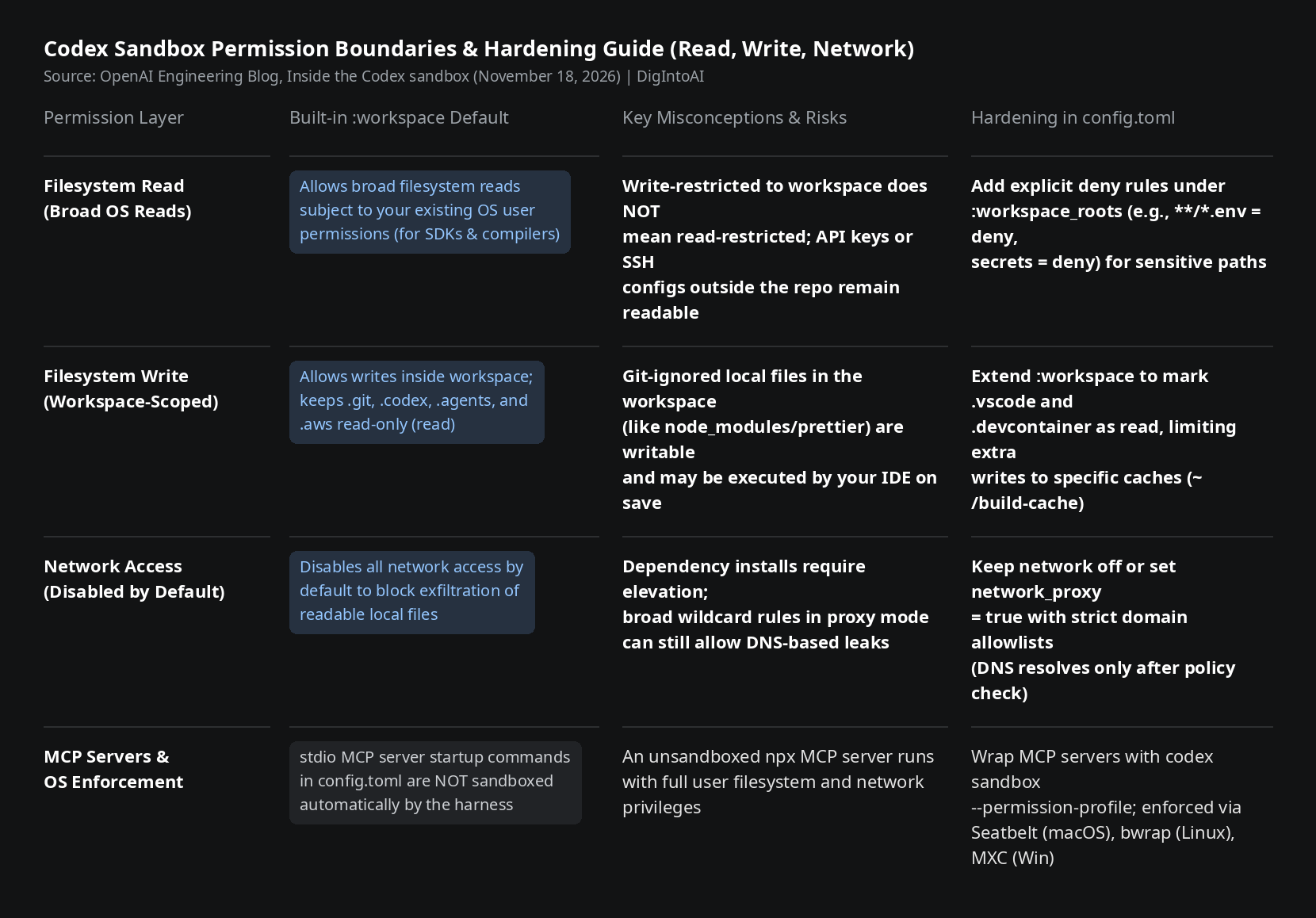
Image source: compiled by DigIntoAI from OpenAI's engineering post Inside the Codex sandbox.
Residual Risks & Practical Hardening Steps in config.toml
**Guarding Git-Ignored Dependencies & Sandboxing stdio MCP Servers: **OpenAI highlights two important boundaries. First, Git-ignored paths inside the workspace (such as node_modules/prettier) are still writable under :workspace; if tampered with, changes will not show up in git status and an external IDE running that tool on save executes outside the sandbox. Second, Codex does not automatically sandbox stdio MCP server startup commands defined in config.toml, meaning an unwrapped npx server inherits full user filesystem and network access.
**Custom Profiles, Network Proxy & CLI Testing: **You can harden your setup in config.toml by creating a profile extending :workspace that marks .vscode and .devcontainer as read, sets all nested .env files and the secrets directory to deny, and enables network_proxy = true with explicit domain allowlists (where DNS resolves only after policy approval to prevent DNS exfiltration). For stdio MCP servers, wrap the startup command with codex sandbox --permission-profile memory-mcp -- npx --offline ..., and validate rules locally using codex sandbox. Under the hood, Codex enforces these profiles natively via Seatbelt (sandbox-exec) on macOS, bubblewrap plus seccomp-bpf on Linux, and is transitioning to Microsoft's MXC (Microsoft eXecution Container) on Windows.