
If you route Claude Code through OpenRouter, LiteLLM, custom AWS Bedrock endpoints, or third-party API gateways and started seeing every turn fail mid-session right after upgrading to v2.1.323 (released November 12, 2026), the culprit is a breaking change in how Claude Code estimates context windows for unrecognized model IDs.
Root Cause: v2.1.323 Assumes 1M Context for Unknown Model IDs
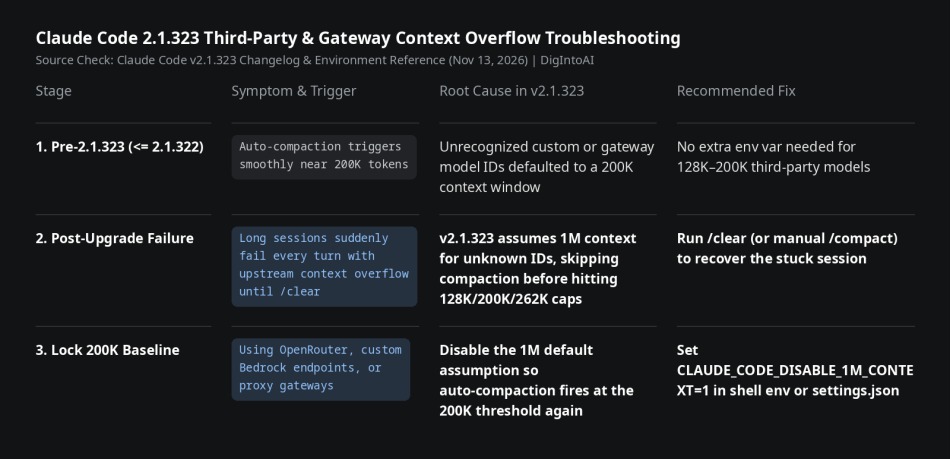
Through v2.1.322, Claude Code conservatively assumed a 200K-token context window for any model identifier outside its built-in catalog, triggering /autocompact before hitting upstream limits. In v2.1.323, Anthropic changed that default assumption from 200K to 1M tokens.
When your actual backend model has a 128K, 200K, or 262K limit, Claude Code believes hundreds of thousands of tokens remain available and skips auto-compaction. Once the conversation crosses the upstream model's real limit, the gateway rejects the payload (typically HTTP 400 / context_length_exceeded), and every subsequent turn fails because the oversized history remains attached.
Three-Step Fix to Restore the 200K Compaction Baseline
Step 1 — Recover a Stuck Active Session: If a session has already overflowed, run /compact to shrink the history. If the payload is already too large for the upstream model to summarize, run /clear to reset the active thread (your project files and CLAUDE.md memory stay intact).
Step 2 — Export the Override Flag in Your Shell: On macOS or Linux, add export CLAUDE_CODE_DISABLE_1M_CONTEXT=1 to ~/.zshrc or ~/.bashrc and reload your shell. On Windows PowerShell, run [System.Environment]::SetEnvironmentVariable("CLAUDE_CODE_DISABLE_1M_CONTEXT", "1", "User") and restart your terminal.
Step 3 — Persist in ~/.claude/settings.json (Recommended): To ensure IDE extensions (VS Code, JetBrains) and GUI launches inherit the setting reliably, add "CLAUDE_CODE_DISABLE_1M_CONTEXT": "1" inside the "env" block of ~/.claude/settings.json and restart Claude Code.