Between November 14 and 25, 2026, a second high-frequency troubleshooting wave hit the Google AI Developers Forum (discuss.ai.google.dev): Antigravity users saw 100% 5h quota remaining in the status panel, yet every prompt to any model immediately failed with 429 RESOURCE_EXHAUSTED or looped on Model unavailable. Separately, other subscribers noticed their weekly quota suddenly plunge to 0%–2% right after November update resets. The mismatch happens because four distinct bottlenecks surface under the same 429 status code.
Four Root Causes Behind '100% Quota Remaining' 429 Errors
**Cause 1 (Officially Confirmed Nov 24) — AGY_ADC_AUTH=true Bypasses Consumer Quotas for Vertex AI: **In a November 24 forum reply, Google staff flagged a common CLI configuration trap: setting AGY_ADC_AUTH=true in Antigravity CLI bypasses your consumer Google AI Pro or Ultra subscription allowance and routes traffic straight to your bound Google Cloud Vertex AI project quota. Your Antigravity UI continues displaying 100% on the untouched consumer 5-hour pool while Vertex AI rejects requests with 429 under its own project RPM limits.
**Causes 2, 3 & 4 — Empty userTier/projectID, Exhausted Weekly Pools & Burst RPM Throttling: **If ADC auth is not active, three other causes explain the error. Second, backend entitlement or partition desync can leave userTier or projectID blank, routing calls into a zero-quota fallback bucket. Third, Antigravity enforces both 5-hour and 7-day weekly pools—if a post-update bug drops your weekly pool to 0%–2%, a refreshed 100% 5-hour bar still gets blocked. Fourth, launching multiple parallel subagents can trip short-burst per-minute RPM limits without depleting the 5-hour volume bar.
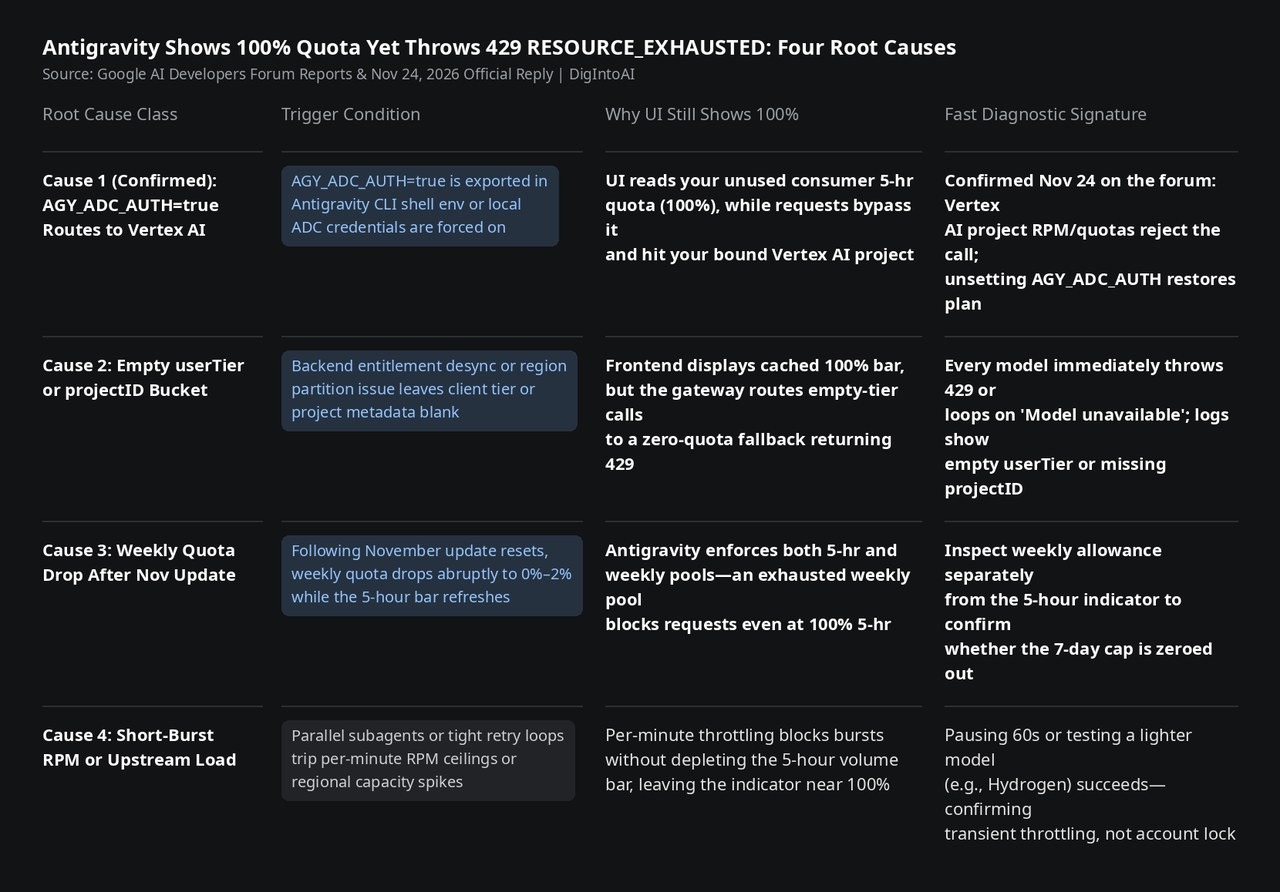
Image source: compiled by DigIntoAI from Google AI Developers Forum reports and the November 24, 2026 official reply.
Four-Step Troubleshooting Loop
**Isolate Env Routing, Dual Pools, and Log Endpoints in Two Minutes: **Step one: inspect your shell environment with env for AGY_ADC_AUTH, GOOGLE_CLOUD_PROJECT, or ADC variables; if you want consumer Pro/Ultra quotas, unset AGY_ADC_AUTH (or set it to false) and restart your terminal—or inspect your Vertex AI regional quotas in Google Cloud Console if intentionally using Vertex. Step two: verify both the 5-hour bar and the 7-day weekly pool separately; for transient burst limits, cut parallel subagents, wait 60 seconds, and test a short prompt on a lighter model such as Hydrogen. Step three: search local logs for userTier, projectID, RESOURCE_EXHAUSTED, and target hostnames to see whether calls hit consumer endpoints or Vertex AI and whether tier fields are empty. Step four: if all models still throw instant 429 with AGY_ADC_AUTH disabled, kill any automated retry loops immediately (spamming 429 risks extended cooldowns) and submit your AGY_ADC_AUTH status, 5-hour and weekly screenshots, client version, and redacted logs on discuss.ai.google.dev while using the Gemini web app or a standalone API key for urgent work.
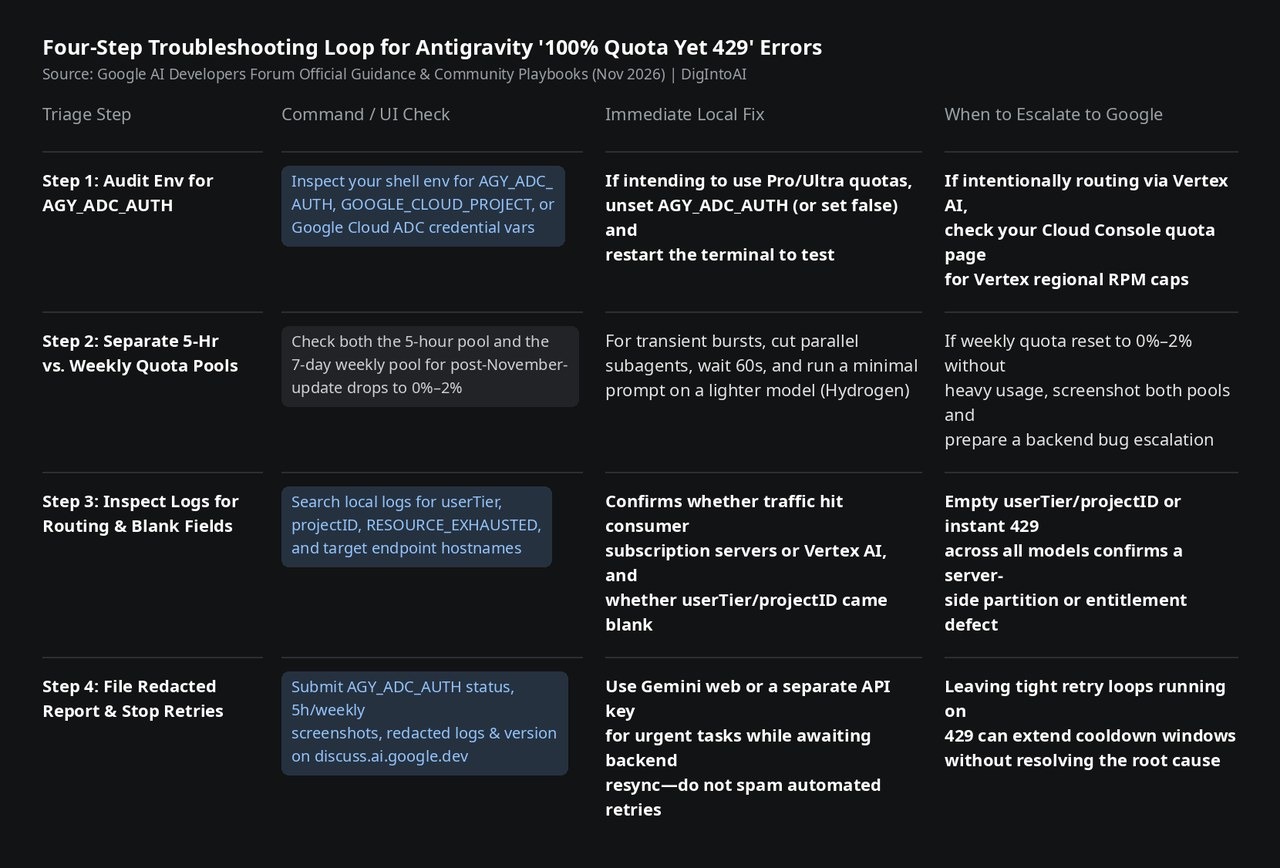
Image source: compiled by DigIntoAI from Google AI Developers Forum troubleshooting steps (Nov 2026).