Between November 23 and 26, 2026, two frustrating blockers drew heavy traffic on the Google AI Developers Forum (discuss.ai.google.dev): Gemini API keys staying locked on HTTP 403 even after increasing monthly spend caps, and Google AI Pro builders hitting cross-project Error ID: 52b52a94 failures in AI Studio Build. Rotating keys or clearing browser caches solves neither issue—here is what actually works.
HTTP 403 Spend Cap Breached: Raising the Number Alone Does Not Unlock the API
**Manually Click 'Lift spend cap' & Allow Up to One Hour: **When a project hits its monthly spend cap and returns HTTP 403 PERMISSION_DENIED — Spend cap breached, simply editing the budget dollar figure upward will NOT automatically lift the enforcement lock. On November 26, Google support staff (Sai_Deepika_K) confirmed the exact unblock step: open Google Cloud Billing, navigate to Budgets & alerts, select the triggered cap, and manually click Lift spend cap. Allow up to one full hour for the unlock to propagate across auth nodes, and double-check that no payment card decline is holding the billing account.
AI Studio Build Pro Error ID: 52b52a94 (Agent execution terminated)
**Account-Scoped Pro Build Failures & Practical Workarounds: **Starting November 24, multiple Pro subscribers reported AI Studio Build failing across every project under their account with Error ID: 52b52a94 (Agent execution terminated / Service unavailable), while a non-Pro account or separate login worked normally. Because the pattern points to a backend Pro Build execution fault rather than local browser state, avoid hammering retry loops: log the exact Error ID 52b52a94, UTC timestamp, and cross-account test on discuss.ai.google.dev, and temporarily bridge urgent work via standard Gemini API calls or a secondary account.
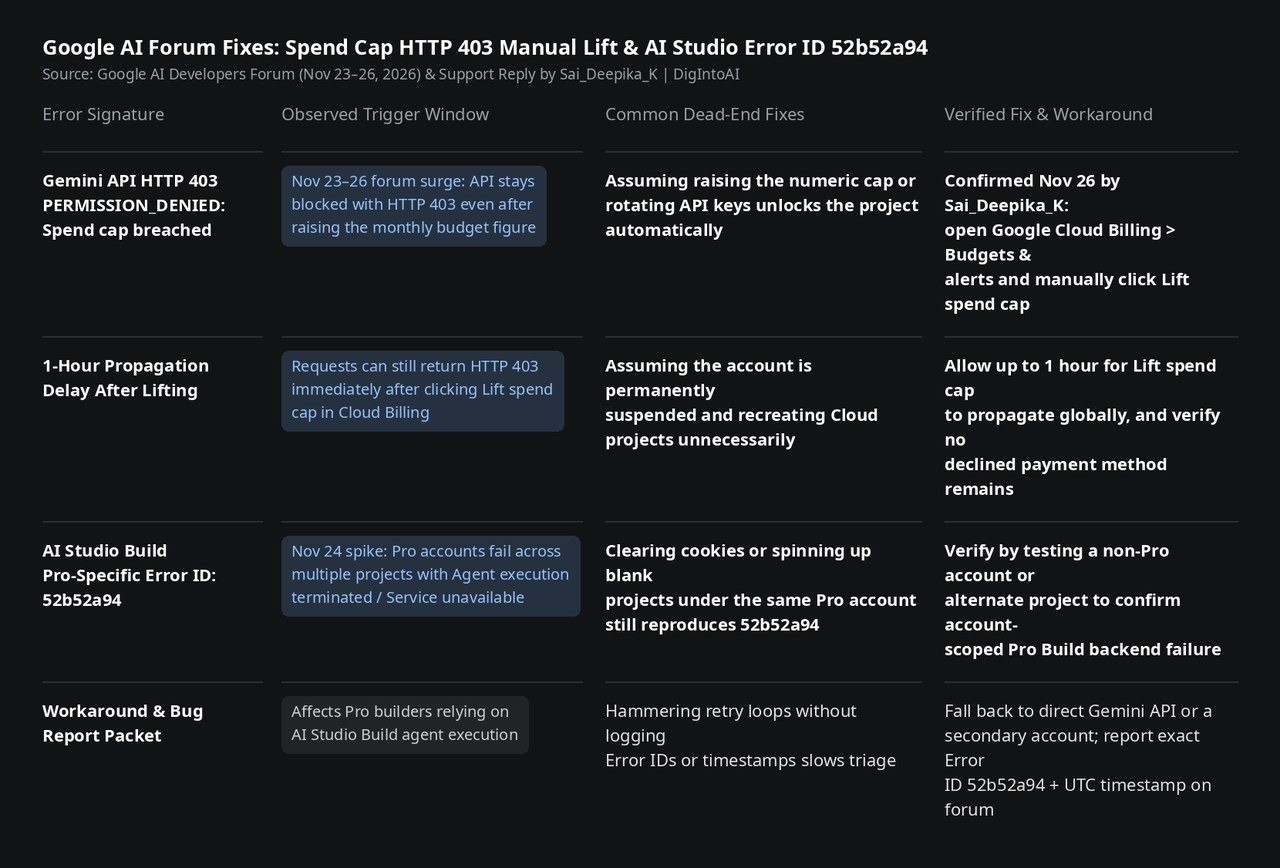
Image source: compiled by DigIntoAI from Google AI Developers Forum threads and official support guidance (Nov 23–26, 2026).