
As teams adopt Claude Code 2.1.330/331 and default Auto Mode across cloud providers, two viral threads on anthropics/claude-code stand out: vanishing VS Code prompt suggestions (#111668) and Auto Mode dead-end blocks (#108905). Knowing which side controls each behavior saves hours of pointless local reinstalls and keeps teams from disabling safety rails.
Issue #111668: VS Code Tab-to-Accept Prompt Suggestions Stopped on November 22
**Cross-Version Server-Side Toggle — Skip Local Reinstalls: **User logs on #111668 show VS Code's Tab-to-accept ghost prompt suggestions abruptly hit zero on November 22 across builds 2.1.327 through 2.1.331, with local promptSuggestionEnabled overrides having zero effect. Because the drop spans multiple client versions simultaneously, it points to a server-side toggle—avoid reinstalling extensions or downgrading and subscribe to #111668 for Anthropic's restore notice.
Issue #108905: Escaping Auto Mode's Dead-End Blocks Safely
**Use One-Step Manual Mode or Scoped Allow Rules—Never bypassPermissions: **Issue #108905 documents a frustrating Auto Mode deadlock: even when a user explicitly instructs Claude to run sensitive commands like gh secret set in chat, the safety classifier blocks execution with no one-time approval button in the UI. Rather than falling back to the dangerous bypassPermissions mode, either toggle briefly to default manual mode to approve that single command once before switching back, or add narrowly scoped, least-privilege subcommand rules under permissions.allow in your user settings.json.
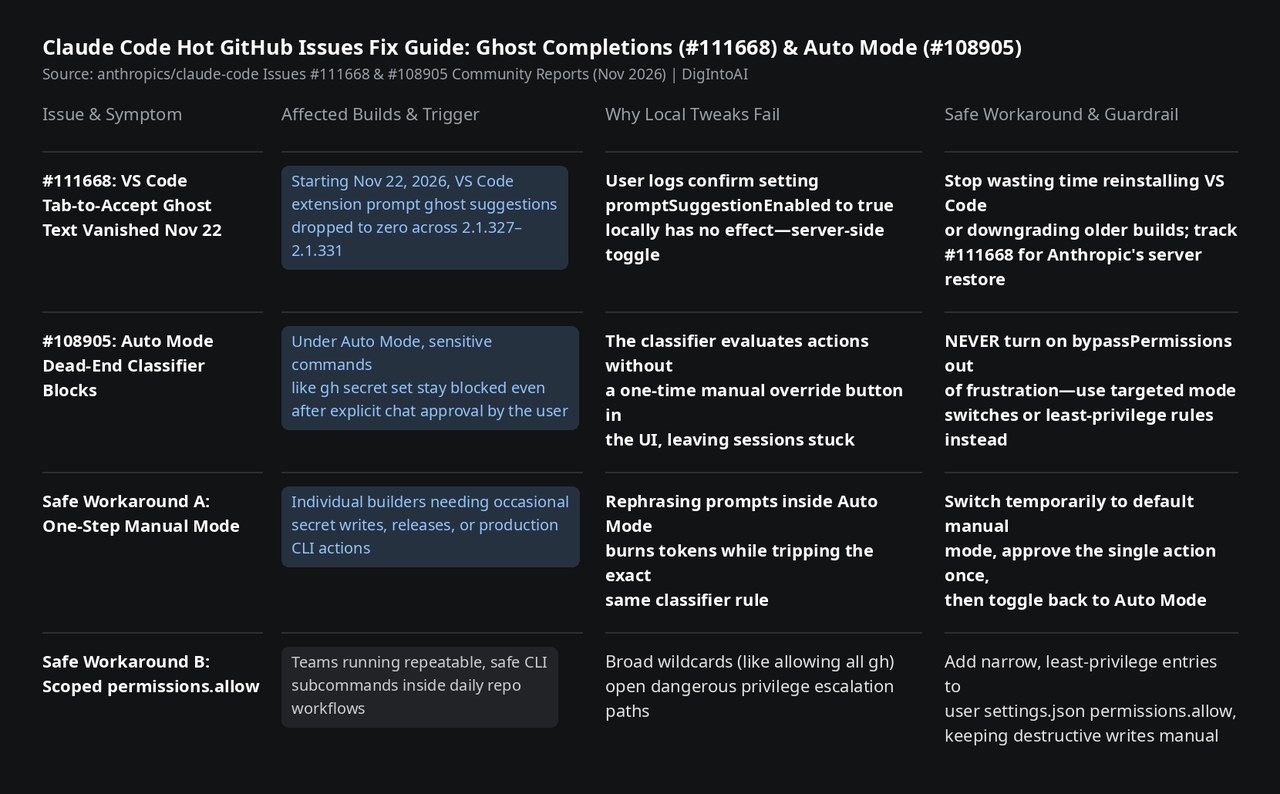
Image source: compiled by DigIntoAI from anthropics/claude-code GitHub Issues #111668 and #108905 (Nov 2026).