
On November 19, 2026, Gemini App Group Product Manager Michael Friedman announced Computer Use in the Gemini app for Mac (gemini.google/mac). Rather than hijacking your cursor or active display, Gemini executes multi-step tasks across local files, native Mac desktop apps, and web browsers inside an isolated background virtual screen while streaming a live preview inside your chat thread.
Background Virtual Window & Cross-App Workflows
**Hands-Free Execution Without Screen Interruption: **Invoked in Task mode by mentioning @Computer use, Gemini clicks, types, scrolls, and navigates menus across apps—such as extracting shipping weights and addresses from local PDFs to fill multi-box quotes, batch color-grading photos in design apps, pulling metrics from live dashboards into Google Slides, or staging resale listings from local image folders—while leaving your primary screen and cursor free.
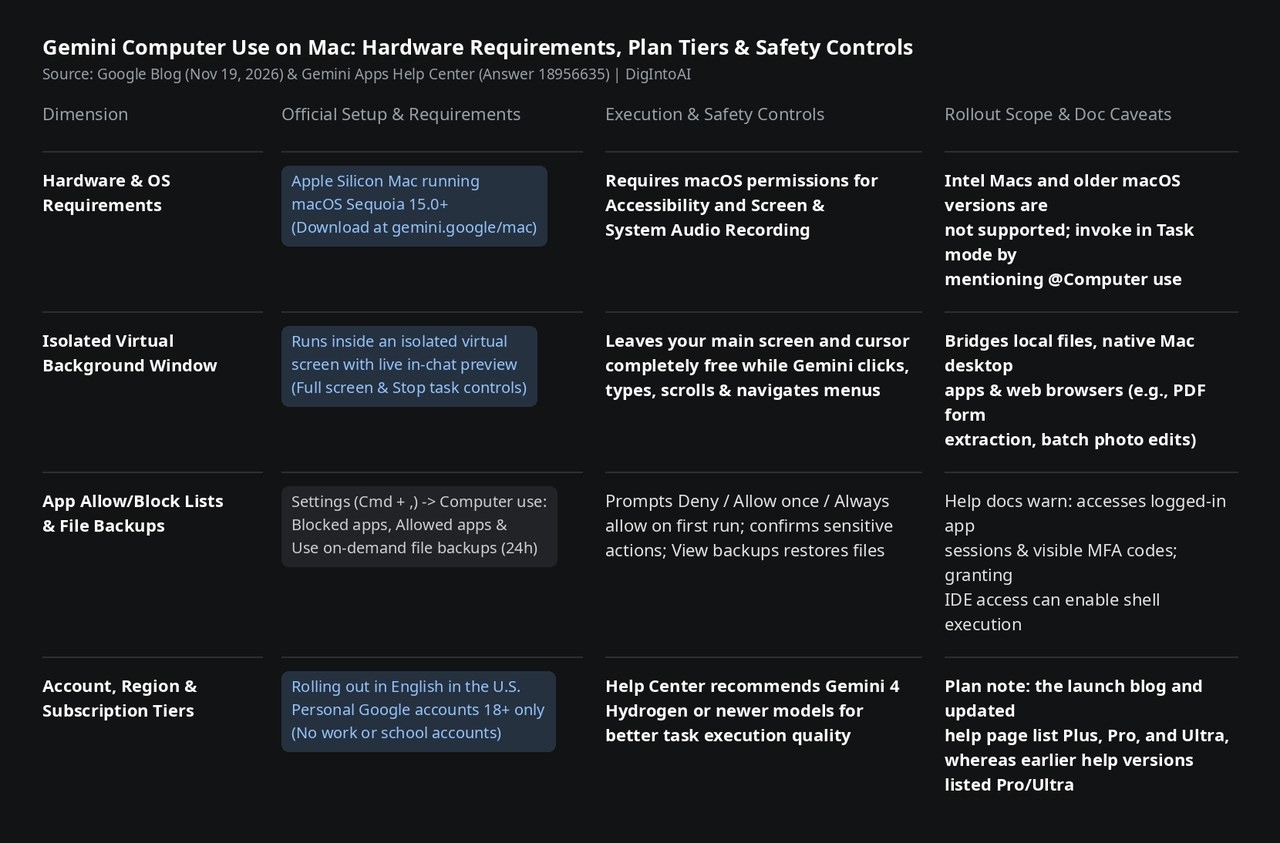
Image source: compiled by DigIntoAI from Google's official blog post and Gemini Help Center documentation.
Permission Controls, File Backups & Subscription Eligibility
**Allow/Block Lists & 24-Hour On-Demand Backups: **Enabling Computer Use under Gemini Settings (Cmd + ,) requires granting macOS Accessibility and Screen & System Audio Recording permissions. Users can configure Blocked apps and Allowed apps lists, approve sensitive actions before execution, and enable Use on-demand file backups (stored for 24 hours or until the next prompt via View backups). The Help Center also notes important safety boundaries: Gemini can interact with already logged-in desktop app sessions and visible MFA codes, and granting access to code editors or developer tools can enable shell execution.
**Rollout Scope & Plan Tier Alignment: **Available in English in the U.S. for personal Google accounts aged 18+ (work and school accounts are excluded), Computer Use requires an Apple Silicon Mac running macOS Sequoia 15.0+ (with Gemini 4 Hydrogen or newer models recommended). Regarding plan eligibility, the announcement blog cites Google AI Plus, Pro, and Ultra; while earlier versions of the Help Center article listed only Pro and Ultra, the current Help Center page has been updated to match all three tiers (Gemini AI Ultra, Google AI Pro, and Google AI Plus).