
On November 20, 2026, OpenAI announced via its official ChatGPT release notes that ChatGPT Space is rolling out globally to ChatGPT Plus users ages 18 and older. Crucially, this rollout is independent of the November 19 ChatGPT dots expansion—meaning pricing guides and feature tables should no longer bundle Dot and Space on a single row as unsupported on Plus.
Separating Space, Dot, and Slides Availability on ChatGPT Plus
**Global Rollout for Space Without Dot's Regional Exclusions: **Unlike ChatGPT dots—which remains in a small gradual test for select Plus accounts excluding the European Economic Area (including the EU), the UK, and Switzerland—ChatGPT Space is rolling out globally to Plus subscribers ages 18+ (only Enterprise and Business workspaces with Canada or UAE data residency remain listed as coming soon).
**Slides Rolls Out Separately—Space Access Alone Does Not Guarantee Slides: **According to OpenAI's updated Space and Slides Help Center guides, ChatGPT Slides is rolling out separately to eligible Plus, Pro, Business, and Enterprise accounts that have Space access, while Sheets is listed as coming soon. On Windows devices lacking the required MXC component (unsupported on Windows 10 and requiring an update or org setting on some Windows 11 machines), local desktop AI slide creation falls back to standard PowerPoint (.pptx) files instead of collaborative Slides, though users can still use cloud mode or ChatGPT on the web.
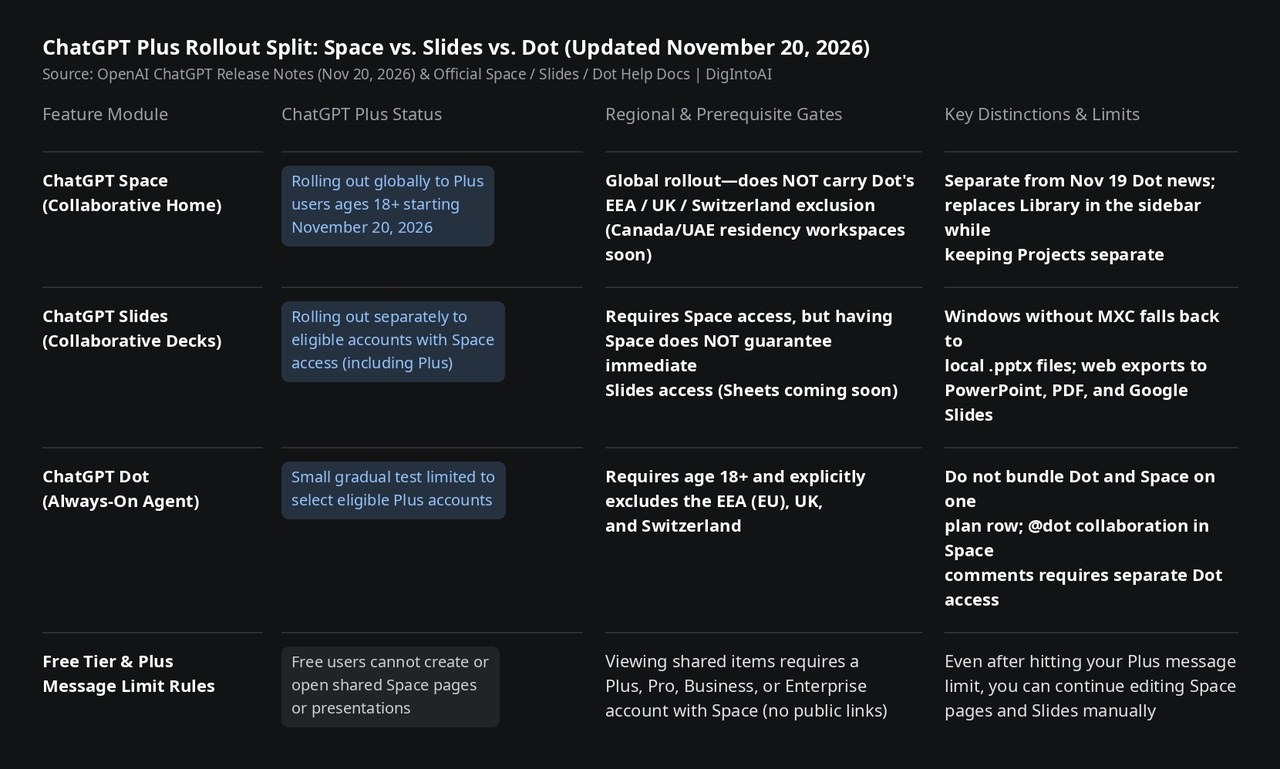
Image source: compiled by DigIntoAI from OpenAI's November 20, 2026 release notes and official Help Center docs.
Replacing Library, Platform Details & Shared Privacy Rules
**Replaces Library While Keeping Projects Separate: **Once enabled, Space replaces Library in the sidebar as the unified home for interactive pages, presentations, images, and uploaded files, while existing Projects stay separate. Users can build auto-updating pages tied to connected apps like Slack, embed charts or interactive 3D models, collaborate in real time, and tag @ChatGPT (or @dot if available) in comments. Even if you hit your Plus message limit, you can still edit Space pages and Slides manually. Opening shared pages or decks requires a Plus, Pro, Business, or Enterprise account with Space access—Free users cannot open them, and public links are not supported.
**Mobile Wording Nuance, Parent Deletion & Training Controls: **Note a minor wording gap across OpenAI's docs: the November 20 release notes state Space supports creating and editing pages on web, desktop, iOS, and Android, whereas the Space Help page notes creation/editing on web and desktop, editing on iOS, and finding, reading, and sharing on mobile. Collaborators should also watch two operational caveats: deleting a parent page moves all nested subpages to Trash (including subpages owned by other people), and while sharing never exposes private chats or personal Memory, each collaborator's own training setting applies when their ChatGPT interacts with shared content (Business and Enterprise data is excluded from training by default).
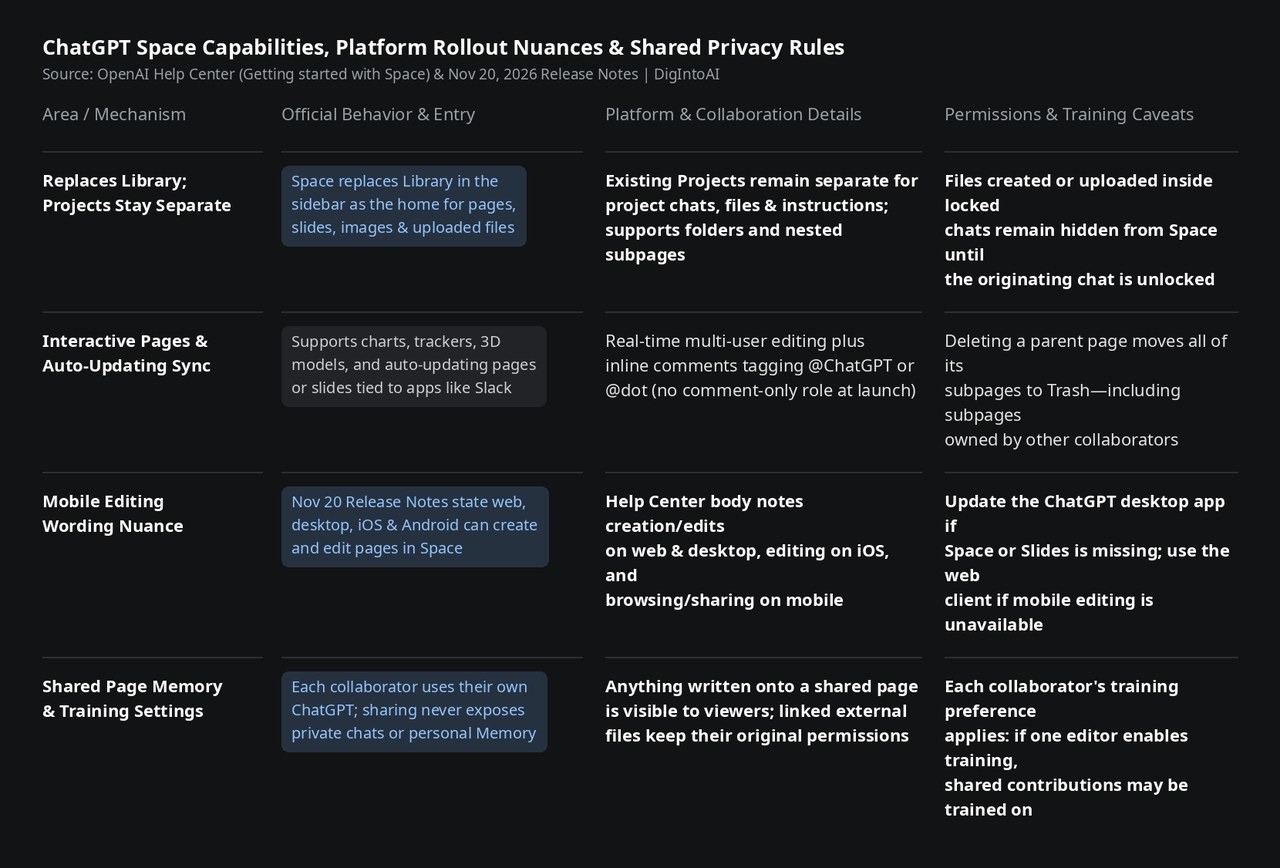
Image source: compiled by DigIntoAI from OpenAI's Space Help Center documentation and release notes.