On this page
Many users assume Google Antigravity's regional restriction simply blocks them at the login screen. In practice, the most expensive trap works the opposite way: you can download, sign in to, and run Antigravity without any error, yet your paid Google AI Pro or Google AI Ultra entitlement never kicks in.
Open Settings and you will see your plan pinned to Antigravity Starter Quota (the free tier), accompanied by a blunt status notice: This account is ineligible for higher rate limits through a Google AI plan at this time.
Even while paying tens or hundreds of dollars per month, Gemini 4 Neon, Gemini 4 Carbon, Gemini 4 Argon, and paid Claude models remain greyed out. The account is restricted to weekly free starter limits on the entry-level Gemini 4 Hydrogen model—and in severe sync failures, even Hydrogen access can be blocked.
Based on developer reports concentrated in November 2026 on the Google AI Developers Forum alongside official support replies, here is how Antigravity verifies eligibility, where cross-region billing fails, and how to check your account before paying.
Why Changing Your Account Region Alone Cannot Fix Antigravity
Numerous online guides suggest filing Google's country-change form to move your Terms of Service country to the United States, Japan, or Singapore. While that may clear a basic login block, it rarely resolves paid entitlement checks.
According to official Antigravity support explanations on the developer forum, the backend does not rely on a single region flag. Instead, it cross-checks three independent signals:
- Google Terms of Service country: the region listed at the bottom of policies.google.com/terms.
- Google Payments profile and actual billing currency: the payment country configured in pay.google.com and the billing origin of the subscription.
- Active network environment: the exit IP region used during sign-in and daily requests.
If these three signals conflict—or if the underlying subscription is billed in an unsupported region—the backend immediately downgrades the account to free-tier. That is why updating your account country or switching to a clean US VPN node still leaves paid models locked.
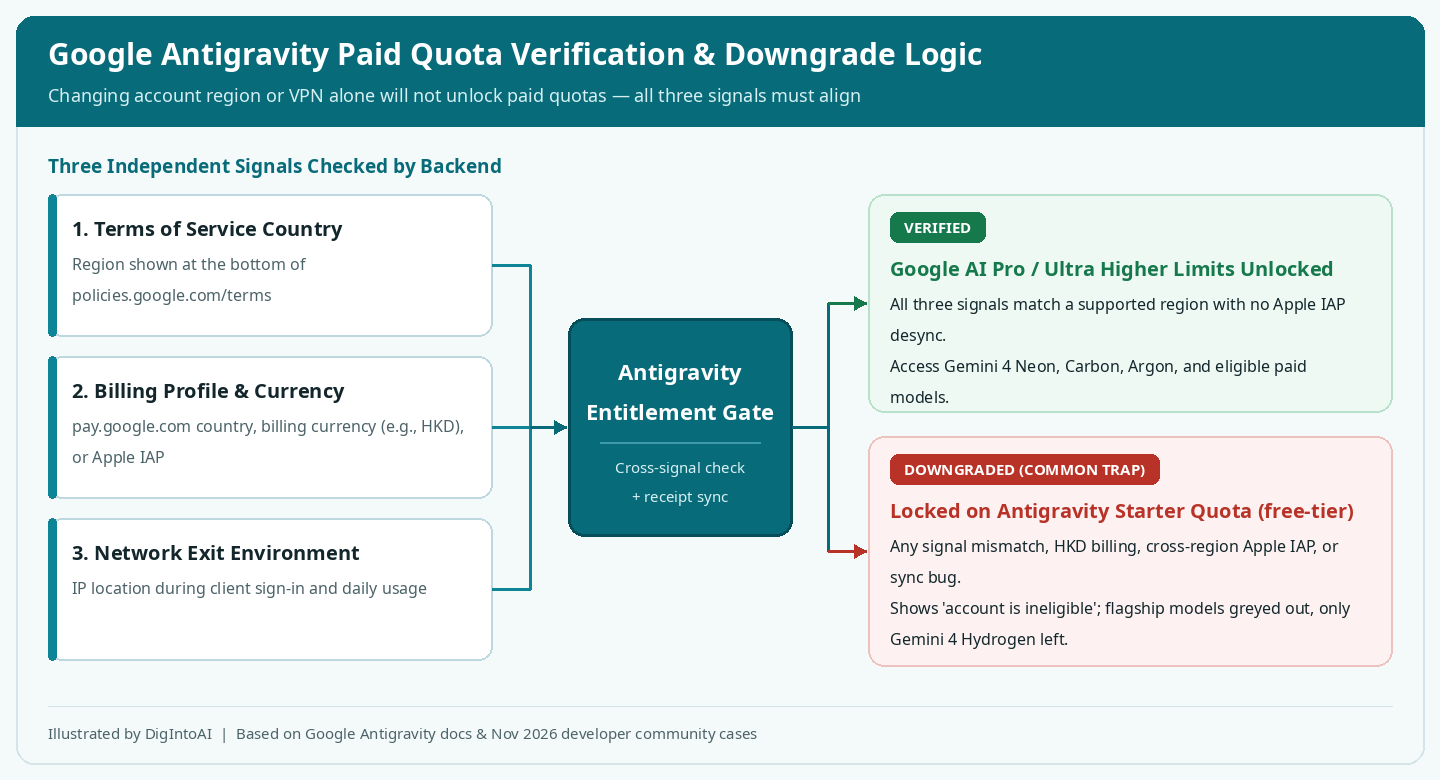
Image source: illustrated by DigIntoAI based on Google Antigravity documentation and November 2026 developer community reports.
Five High-Frequency Pitfalls Documented by Developers
Pitfall 1: Account Moved to a Supported Country, but Billed in HKD
This is one of the costliest traps for developers in Greater China. In late November 2026, multiple near-identical cases surfaced on the Google AI Developers Forum:
- One developer set their Google Terms of Service region to Thailand (a supported country), and Gemini on the web recognized their Google AI Pro plan with full access to Gemini 4 Neon. However, because the 5 TB plan was billed in Hong Kong dollars (HKD) through a Hong Kong payment profile, Antigravity locked the account on Antigravity Starter Quota with Neon, Argon, and Carbon disabled.
- Another 5 TB Pro subscriber passed 18+ age verification and aligned their Terms of Service country to a supported region, yet still paid in HKD. Official community support confirmed directly that HKD-billed subscriptions cannot qualify; users genuinely residing in a supported region must contact Google One support to cancel the existing plan and re-subscribe using a supported-region payment profile.
Pitfall 2: US Google Account Paired with a Hong Kong Apple ID In-App Purchase
To bypass foreign credit card requirements, many users combine a US Google account with an Apple App Store subscription paid through a Hong Kong or Taiwan Apple ID. This setup hits two separate walls:
- Billing-origin mismatch: even when the Google account itself shows the United States, the underlying billing receipt originates from an unsupported App Store storefront. Google One and Gemini web display an active subscription, but Antigravity's entitlement endpoint rejects it.
- Apple App Store entitlement desync: even when a user's Google Terms of Service region and payment profile are both fully set to the United States, 5 TB Pro and 30 TB Ultra subscriptions purchased via Apple IAP have suffered widespread desync issues since November 2026. Developers who inspected the backend fetchLicenses and userInfo endpoints across Taiwan, Singapore, Japan, and US exit IPs received free-tier in every test, while quota queries returned 403 SUBSCRIPTION_REQUIRED.
Pitfall 3: Assuming Gemini Web Access Guarantees Antigravity Access
Gemini on the web and the Antigravity client do not share identical eligibility checks or real-time license sync. Many affected users confirm that one.google.com displays an active 5 TB or 30 TB subscription and flagship models work fine in the browser and mobile app, while Antigravity still treats them as free users. Working on Gemini web never guarantees Antigravity eligibility.
Pitfall 4: Activating a Promotional Trial on Top of a Paid Plan
In mid-November 2026, several paid Google AI Ultra subscribers billed through Apple reported that accidentally triggering a promotional free trial overwrote their active paid tier. Paid third-party access such as Claude 5.5 disappeared immediately, and Google Colab Ultra compute units were wiped at the same time. Worse still, Google One support stated that a cancelled trial period cannot be terminated early by hand, forcing users to wait until the trial cycle expires.
Pitfall 5: Hidden Account-Type, Family-Group, and Age Gates
Beyond region and billing mismatches, four additional account conditions will keep a paid user stuck on Starter Quota:
- Family group members: Antigravity only grants higher limits to the Primary Plan Manager listed in one.google.com/settings; shared family members do not inherit paid quotas.
- Workspace, education, or custom-domain accounts: consumer Google AI plans apply only to personal @gmail.com accounts; Workspace and education domains follow separate enterprise licensing.
- Missing 18+ age verification: accounts that have not completed adult verification at myaccount.google.com/age-verification are blocked from quota upgrades.
- Trial and promotional plans: free trials and certain promotional or student trials do not unlock full paid model tiers inside Antigravity. For instance, Claude Opus 5.5 and Sonnet 5.5 require a standard non-promotional paid Pro or Ultra subscription, and some trial tiers exclude top Gemini 4 flagship models.
Four Checks to Complete Before Paying
If you plan to buy Google AI Pro or Google AI Ultra specifically for Antigravity, walk through these four checks in order before paying:
- Sign in to the free client first: install the latest Antigravity client and log in with your target personal @gmail.com account before buying anything. Open Settings and check Models & Usage. If it already warns that this account is ineligible for higher rate limits through a Google AI plan at this time, do not subscribe until you resolve the account's region and verification status.
- Align all three account records: visit policies.google.com/terms to verify your country is supported by Antigravity (such as the US, Japan, or Singapore; Hong Kong and mainland China are unsupported); check pay.google.com to ensure your payment profile matches that same supported country with no leftover Hong Kong profiles; and confirm 18+ verification at myaccount.google.com/age-verification.
- Subscribe directly on Google One web instead of Apple IAP: if Antigravity is your primary goal, pay directly through Google One on the web with a supported-region payment method. Skipping Apple's receipt relay prevents cross-region billing conflicts and sharply lowers the risk of entitlement desync.
- Ignore all promotional trial prompts once subscribed: never click a free trial offer on an account that already carries an active paid plan.
Already Stuck on Starter Quota? How to Cut Your Losses
Identify which scenario fits your account first instead of wasting hours cycling VPN nodes or reinstalling the app.
Case A: Billed in HKD or via a Hong Kong Apple ID
Stop switching proxy IPs, clearing caches, or submitting ToS country transfer requests—the backend will not clear an unsupported-region billing source based on IP changes. Only two practical options remain:
- Cancel and re-subscribe cleanly: turn off auto-renewal (or request a refund from Apple if still inside the refund window). Once the current cycle ends completely, re-subscribe on an account whose region, payment profile, and billing method all belong to the same supported country.
- Decouple web usage from local coding: if you are locked into an annual or non-refundable plan, keep using it for Gemini on the web and Google One storage. For local IDE coding agents, switch to pay-as-you-go APIs via Vertex AI (Google Cloud natively supports Hong Kong) or OpenRouter inside plugins like Cline or Roo Code, rather than paying twice for overlapping monthly subscriptions.
Case B: Account Region, Payment Profile, and Currency Are All Supported (Sync Bug Only)
If your subscription is fully compliant—including a supported-region US or Japan Apple IAP—but still stuck on Starter Quota, run through the official refresh sequence:
- Update Antigravity to the latest version and click the Refresh icon next to Models & Usage in Settings.
- If you subscribed through the Apple App Store, open the Google One app on the original iPhone or iPad used for purchase, sign in with the same Google account, and tap Settings then Restore purchases to force a receipt sync.
- Quit Antigravity completely, revoke Google Antigravity access at myaccount.google.com/connections, and delete local cache directories (under your home directory at .config/Antigravity/ and .gemini/ on macOS and Linux).
- Relaunch Antigravity and complete sign-in via an incognito browser window. If it still reports free-tier, submit an in-app Auth and Billing report with language_server.log attached so engineering can manually refresh your license backend.
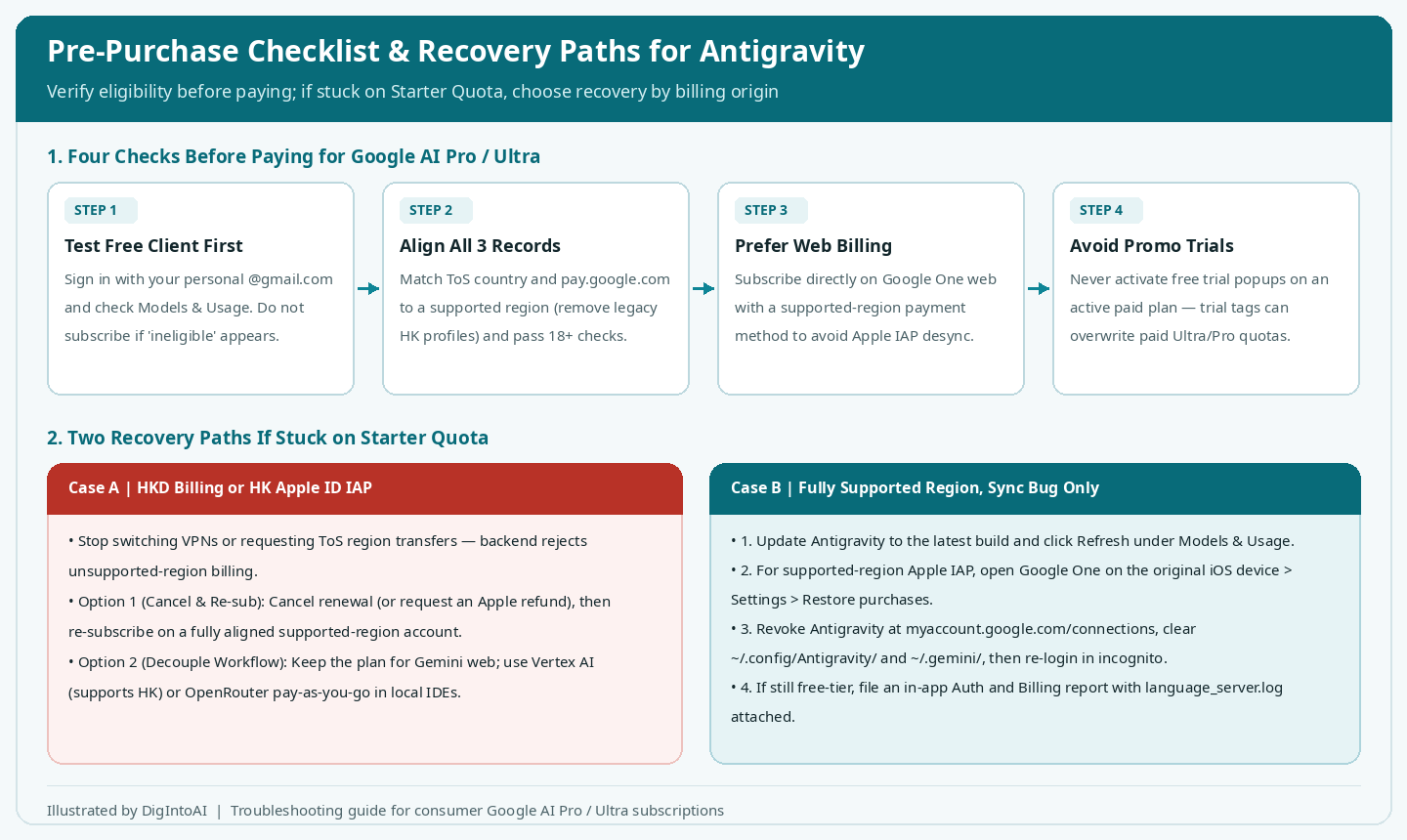
Image source: illustrated by DigIntoAI.